LinkedIn posts that sound like you1.

Paste 3 to 5 posts you already wrote, then jot two rough lines about your week. Presolio drafts in your own words and footnotes every reused phrase to the post it came from.

$15 one-time for 50 drafts · No subscription · Never logs in to LinkedIn

1Drafted from posts you already wrote. Every phrase you reuse is underlined and numbered, and opens the post it came from.

Alex Morgan

Product lead · B2B onboarding

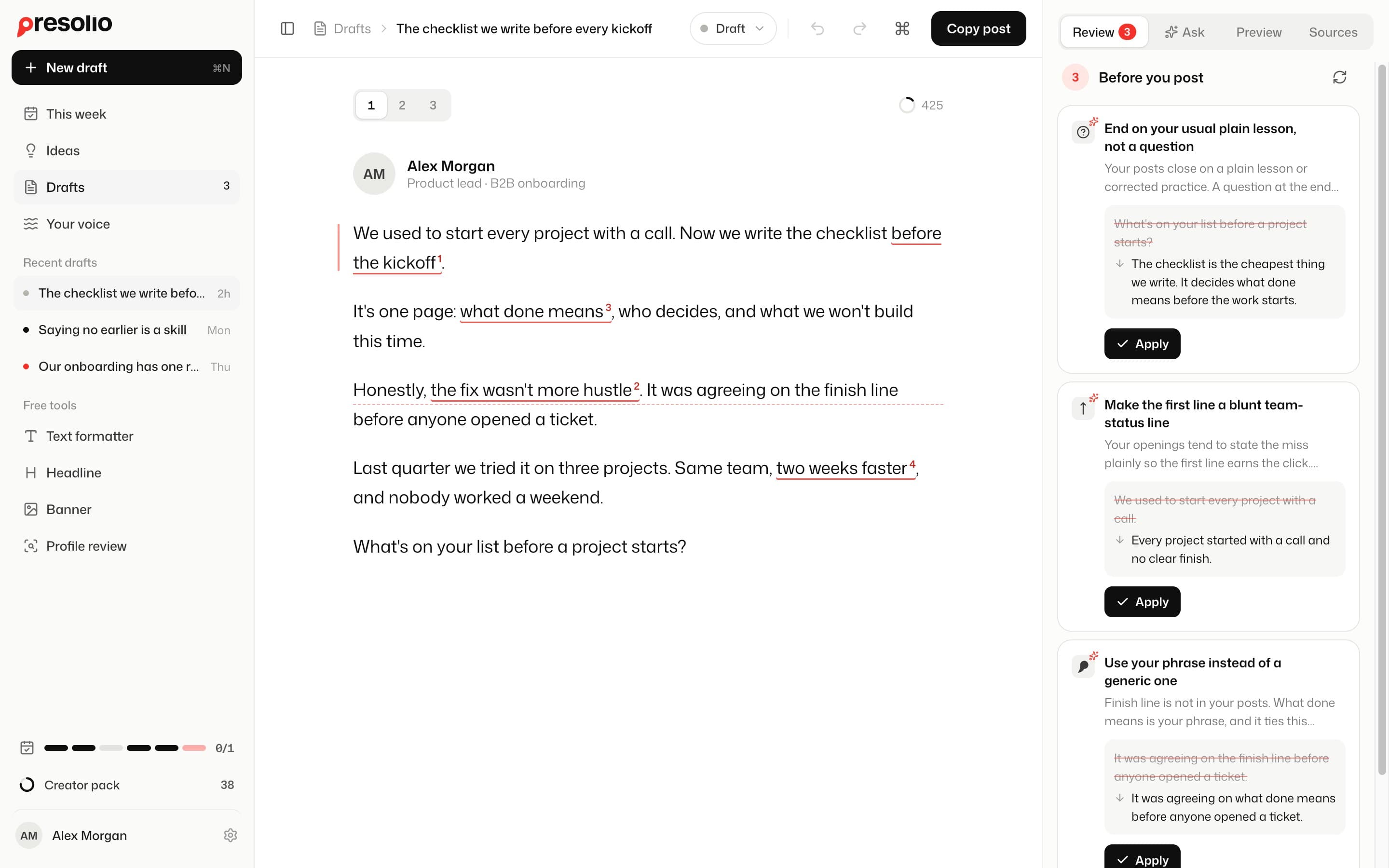
We used to start every project with a call. Now we write the checklist before the kickoff1.

It’s one page: what done means2, who decides, and what we won’t build this time.

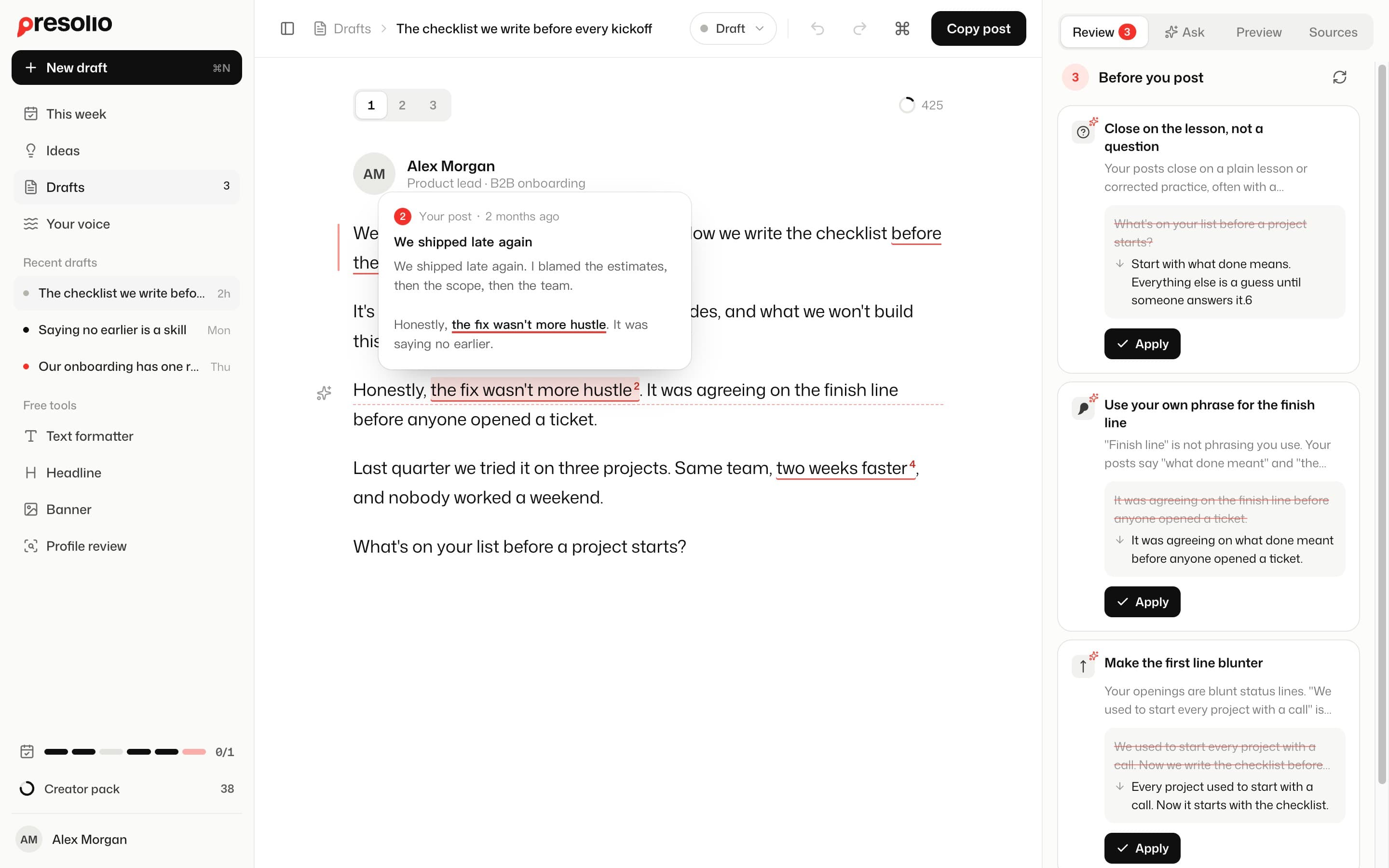
Honestly, the fix wasn’t more hustle3.…see more

3Your post · 2 months ago

We shipped late again

I blamed the estimates, then the scope, then the team. Honestly, the fix wasn’t more hustle.

“before the kickoff”1“what done means”2“the fix wasn't more hustle”3“two weeks faster”4“saying no earlier”5“before the kickoff”1“what done means”2“the fix wasn't more hustle”3“two weeks faster”4“saying no earlier”5

For people with real work to talk about.

Anyone can spot a prompted post in the first line

Give a blank prompt a real client story and it turns it into a victory lap. Presolio works from the same rough notes, follows how you open, pace, and close a post, and marks every phrase pulled from your earlier writing.

The same week, from a blank prompt

Thrilled to share a counterintuitive lesson from our client journey this week. When a prospective partner asked us to migrate seven complex integrations, we didn’t just nod and send an invoice. Instead, we delved into 30 days of usage data, streamlined the roadmap to the two workflows driving 96% of impact, and trimmed $14,000 from our own quote.

Here is the truth: walking away from short-term revenue isn’t a loss. It is the ultimate differentiator. That single shift turned a six-week bottleneck into an eleven-day win, fostering alignment before day one. Let that sink in.


Same facts, buried under eight phrases you would never say out loud
Drafted from your posts

We talked a prospective client out of $14,000 of work on Tuesday. They wanted seven integrations migrated before June, so before sending a number1 we asked for 30 days of their webhook logs. Two integrations drove 96% of the volume, and three hadn’t fired since October.

We cut the build down to those two pipelines plus a weekly CSV export for the edge cases. Listing what stays out of phase one2 right above the fee turned a six-week quote into an eleven-day project, and they signed on Thursday.

Stakeholder wishlists are built from three-year-old edge cases, not last month’s traffic. Pull the usage data first, and say no in the proposal3 instead of four weeks into the build.

  1. 1Why we stopped estimating from kickoff calls
  2. 2The one-page SOW we used all year
  3. 3Bad projects start with polite estimates

Start from your week, finish in your voice

  1. Start with two lines from your week

    Write two rough lines about what happened this week, and Presolio offers three angles leading with an admission, a number, or a decision. Pick the opening line that fits and get three versions drafted from your past posts.

    • Three angles with first lines
    • Three full versions per pick
    • Borrowed phrases footnoted to past posts

    This week

    We stopped writing free proposals this week and charged $1,500 to scope the work first. Most leads walked away, and the client who paid approved the build without haggling.

    Leads with an admission

    Most leads walked away this week

    We lost most of our leads this week after we stopped writing free proposals.

    Leads with a number

    $1,500 to scope the work first

    Putting a $1,500 price on scoping filtered out everyone shopping for a free plan.

    Leads with a decision

    No more free client proposals

    We stopped sending free proposals this week and made scoping a paid step.

  2. Shape the draft in your own words

    Press Tab to take a grey continuation, or double-click a word to see alternatives marked from your older posts. Select any line to make it shorter, plainer, or more like you, shown as a visible change you accept or discard.

    • Tab accepts grey text continuations
    • Word swaps marked from your posts
    • Accept or discard visible line edits

    It’s one page: what done means2, who decides, and what we won’t build this time. The first line on it isalways the same question: who gets to say we’re finished?Tab

    It was agreeing on the finish line before anyone opened a ticket.

    Ask Presolio to rewrite this…
    aligningsayingdecidingsettling

    We used to start every project with a call. Every project used to start with a call. Now we write the checklist before the kickoff1.

    Accept ⌘↵Discard Esc
  3. Check the cutoff, then copy and paste

    Review final suggestions that cite your past writing without changing your own phrases, and check the 3,000-character limit and “…see more” cutoff. Presolio never logs in to LinkedIn, so you copy the post and paste it yourself.

    • Shows where LinkedIn cuts the post
    • Your own phrases stay untouched
    • Never logs in to LinkedIn

    Close on the lesson, not a question

    Your posts usually end on what you learned. Three of five close that way.

    What’s on your list before a project starts?

    Start with what done means. Everything else is a guess.

    Apply
    210DesktopMobile

    We used to start every project with a call. Now we write the checklist before the kickoff.

    It’s one page: what done means, who decides…see more

    Readers stop here

Your voice, on file

Presolio learns how you open, how long your lines run, how you end, the phrases you reuse, and words you never use. Every draft starts here.

  • Starts with three to five old posts
  • Typed in, or read from a screenshot
  • Edit or forget anything it learned

Learned from 5 posts

Edit · Forget

About 9 words a line · one idea per line

Opens with
A short admission
4 of 5
Ends with
A plain question
3 of 5

before the kickoff1, the fix wasn't more hustle2, saying no earlier3

Never usesleveragesynergygame-changer

From rough notes to finished post on one screen

Draft from what happened this week, check your phrasing against posts you already wrote, and trim before you copy.

The post a phrase came from, opened in place
A suggestion before posting: why, the exact change, and Apply
  1. 1Footnotes to your past postsEvery phrase reused from your older writing is underlined and numbered. Hover any footnote to read the post it came from.
  2. 2Three versions per draftEach angle comes back as three full versions, so you compare openings instead of rewriting from scratch.
  3. 3The “…see more” cutoffA line in the preview marks the exact point where LinkedIn folds your post in the feed, before you paste it.
  4. 4Voice review before you copyPre-post suggestions cite your own writing habits and show the exact edit first. Phrases from your past posts are never changed.

Small tools, all in the editor

Ask the editor
Ask reads both your current draft and your past posts, then proposes concrete edits you can apply in one click.
Command palette
Switch between your three versions, open the feed preview, run a voice check, or copy the finished post from one keyboard menu.
Read old posts from screenshots
Drop in screenshots of past LinkedIn posts instead of hunting down links. Presolio reads the text out word for word.
Visible changes you control
Select a line to make it shorter, plainer, or closer to how you talk. Every suggested edit shows the exact change to accept or discard.
3,000-character check
A live counter tracks LinkedIn’s 3,000-character limit while you edit, so a finished post never gets cut off when you paste.

Make the opening hit harder

Proposed an edit

We used to start every project with a call.

Our kickoff calls were an hour of guessing.

Apply

Not a blank chat prompt, a template pack, or a ghostwriter

Chatbots guess how you sound. Templates flatten real work into fill-in-the-blank hooks. Ghostwriters cost a monthly retainer and write for you. Presolio starts from your rough notes and the posts you already wrote.

PresolioGeneral AI chatGhostwriterPost templates
Learns from 3 to 5 posts you wrote
Footnotes phrases reused from your old posts
Rewrites a single line, keeps the rest
Marks where LinkedIn cuts to “…see more”
You stay the author of every line
How you pay$15 for 50 draftsMonthly planMonthly retainerFree to monthly

Free tools. No account, no watermark

Standalone browser utilities for formatting a post or tightening your profile. Open one, finish the job, and copy or export your work.

Also free: a post preview for the “see more” cut and a profile picture checker. All free tools

Recent updates in the Studio

New editing controls and refinements, documented as they ship.

  1. Nov 13

    Word swap

    Double-click a word for ones you would use. Words from your own posts are marked.

  2. Nov 13

    Ghost text

    Pause at the end of a paragraph and Presolio continues in grey. Tab to take it.

  3. Nov 12

    Review before posting

    Suggestions that cite your voice, with the exact change and one-click undo.

  4. Nov 12

    Posts from a screenshot

    Add old posts by dropping in a screenshot instead of copying them out.

Pay once for 50 drafts. No subscription.

Free tools

$0

Free to use in your browser. No login, no watermark.

  • Text formatter that survives pasting
  • Post preview with the “see more” cut
  • Profile headline generator
  • 1584 x 396 browser banner maker
  • Profile picture checker
  • Profile review with concrete rewrites
Open a free tool

Creator pack

$15for 50 drafts, once

One-time $15 payment in USD for 50 drafts, with three versions of each.

  • Voice profile learned from 3 to 5 of your posts, editable anytime
  • Weekly prompts that turn two rough lines into three angles
  • Three full versions per draft, with reused phrases footnoted
  • Tab continuation, word alternatives, line rewrites, and Ask
  • Voice review, “…see more” fold marker, and 3,000-character check
  • Nothing renews

    No subscription and no automatic charge later. When the pack runs out, you decide.

  • No browser extension

    Presolio never reads or changes your LinkedIn pages, so a LinkedIn update can't break it.

  • Unused pack, full refund

    Ask within 14 days if you haven't used a draft from it.

  • Failed drafts come back

    If the AI can't write a draft, it's returned to your balance automatically.

Questions

No. Presolio never logs in to LinkedIn, never asks for your credentials, and never posts on your behalf. You write in the Studio, copy the finished text, and paste it into LinkedIn yourself.

Your next post is already in your old ones.

Start with your posts